

Who this case is for
If your shop has hundreds or thousands of products on iGetWeb or another hosted site builder and it’s time to move, whether because the platform is closing or because you want a site that works on phones and that you can edit yourself, the first question is almost always the same: “Will I lose my Google rankings?”
This case is the long answer to that question. We walk through every step we actually took with a Porsche genuine parts store carrying 1,576 products: demos the client could click through, a like-for-like move of the whole shop, the switch to WordPress, the redesign, 301s for every link, and the handover to the shop’s own team.
MCR Autoparts has given us permission to name them and show the work in this case study.
Watch the project summary (2:30)
From our YouTube channel (Thai narration): old site and brief → website migration → SEO migration → before/after → new homepage → mega menu → product page → mobile
Before / after: the old site and the new one
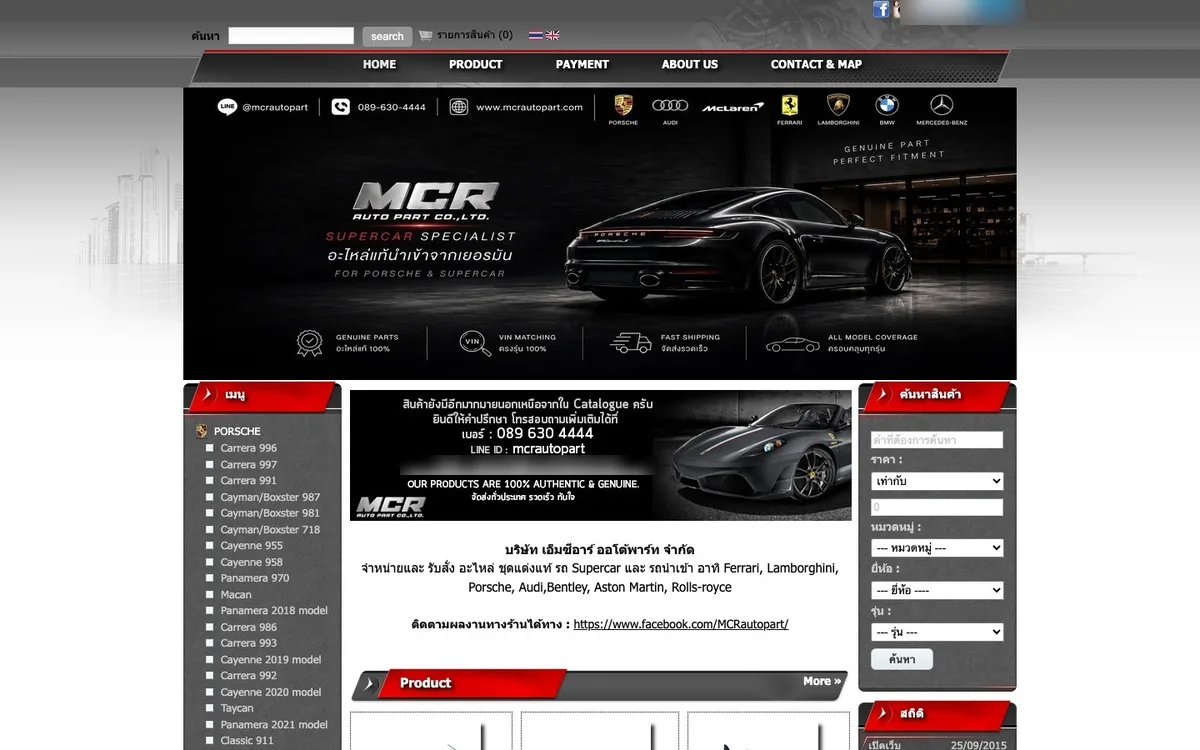
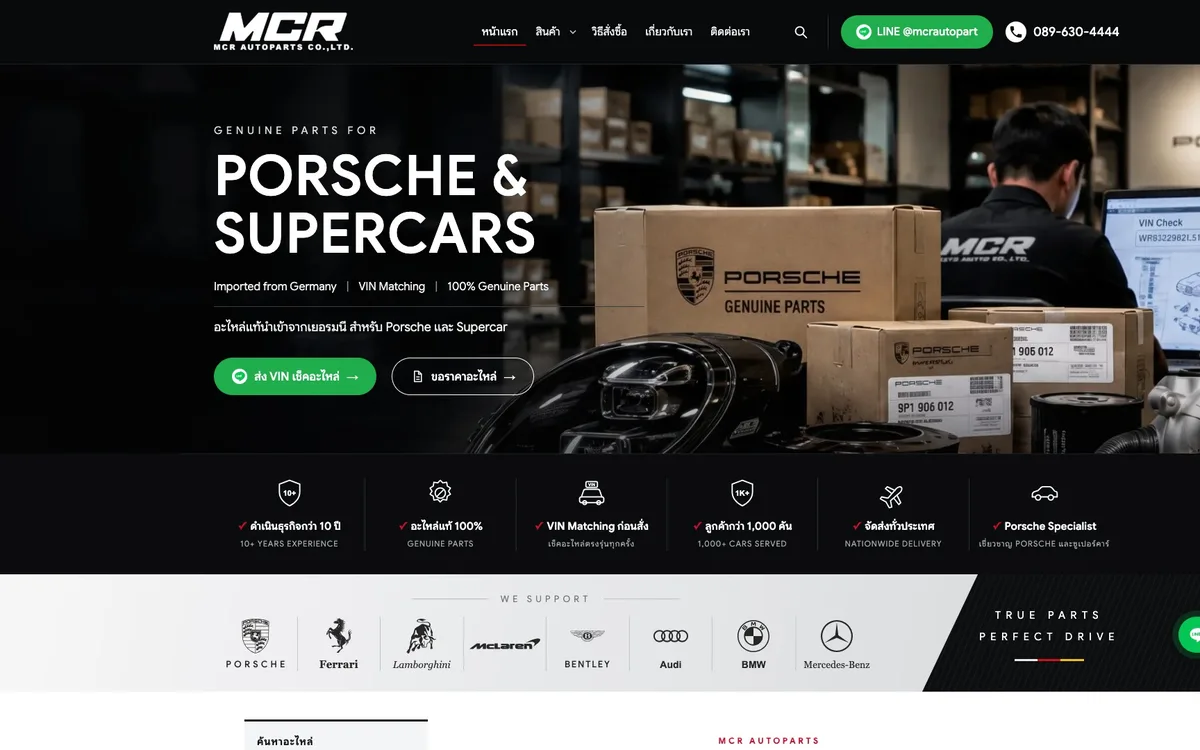
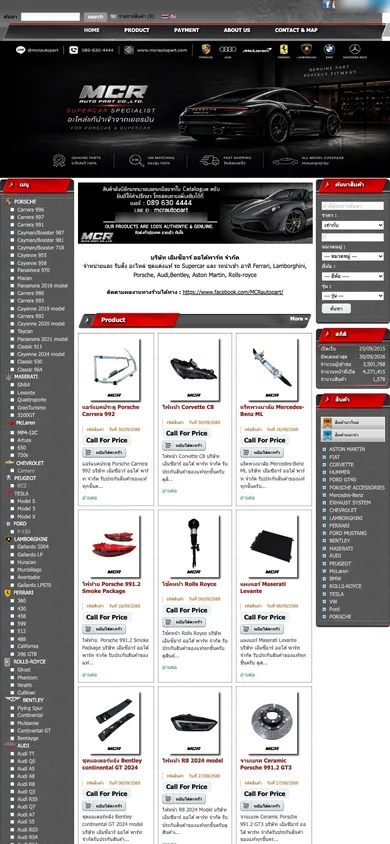

Screenshots of the old site (before the move) and the new site on the test domain, 6 Oct 2026 · a personal email address is blurred
1. The shop, and why it had to move
MCR Autoparts imports genuine parts for Porsche, supercars and European cars, and has been doing it for more than 10 years. The way it sells is interesting: there are no prices on the website at all. Every item is “Call For Price”. Customers send their VIN over LINE, the shop confirms the part fits, and then quotes. So the website is a catalogue: its job is to help people find the part, then get them into LINE.
The first message we received from the shop said they needed to move their catalogue website from the existing hosted platform (iGetWeb) to WordPress or another suitable system, because the provider will be closing at the end of the year.
So this move had a deadline, and what had to come along wasn’t just the look of the site. It was 1,576 products, all their photos, and every link built up since 2015.
| Old website facts | Details |
|---|---|
| Platform | iGetWeb, live since 2015 |
| Products | 1,576, every one listed as “Call For Price” |
| Car makes | 22, including Porsche, Ferrari, Lamborghini, Bentley and McLaren |
| Menus | A 119-item make/model menu on the left and a 23-item product list on the right |
The shop asked for something we really like: two demos before deciding, one hand-coded and one on WordPress, using the same 20–30 real products. They wanted to see how adding a product, changing a photo or changing a category works, whether there are fields for part numbers, car models and SEO, what the sitemap and 301s look like, and how it all behaves on a phone.
An owner who asks that isn’t just after a prettier website. They want to know they can run it themselves afterwards, and that nothing will get lost on the way.
2. Phase 0: two demos the client could click through
On 11 September 2026 we put both demos on test sites, using 30 real products in 9 categories and the real photos from the old site throughout. We rebuilt the old homepage layout piece by piece, from the search bar and 5-button menu to the banner and three-column layout, so the shop saw its own products on the new system rather than a sample template.
| Hand-coded demo | WordPress demo | |
|---|---|---|
| Real products | 30 · 9 categories | The same set |
| Sitemap | 44 URLs | Updates itself |
| Sample 301s | 198 rules | Built into the system |
| Strength | Very fast (TTFB around 0.14 s) | The shop edits everything in the admin |
| Test account | — | Separate client role, no access to plugins |
We built both demos before charging anything. In our experience, ten minutes of explaining is worth less than letting an owner add one product themselves. Once they’ve tried it, the conversation about systems gets a lot shorter.
3. Before touching anything, we audited the old site
Before any migration we want to know two things: what has to come across complete, and what’s most valuable and must not break. So we went through the live pages, pulled data from Ahrefs, and later compared everything with the shop’s official product export.
| What we checked | What we found |
|---|---|
| Mobile | No viewport setting; the 1,000 px desktop page was shrunk onto phones |
| About / Contact | Images only, so Google couldn’t read the text |
| Sitemap | Fewer than 60 URLs, with no product pages at all |
| Product SEO | Titles were just the product name; meta descriptions were empty on every page |
| Product descriptions | 53 contained long runs of repeated keywords |
| Part numbers | The part number field was empty for all 1,576 products |
| Categories | A separate sub-category for each individual product: 1,728 rows |
| Analytics | Still tied to Universal Analytics, which Google has shut down |
| Bot access | Ahrefs’ crawler got a 403 on every URL |
Ahrefs data from 18 Sep 2026 (estimates) · other findings from the live site and the shop’s export
These numbers told us two things. First, Google had almost no way to walk into over a thousand products, which is a big opportunity for the new site to win back. Second, what needed the most care during the move was the homepage, with links from 609 domains pointing at it, plus the 4 pages still getting Google visitors: the Cayenne 958, Boxster 986 and Carrera 991 categories, and a Tesla Model 3 wheel product.
4. Phase 1: a like-for-like move first, improvements later
Many owners want to change platform and design at the same time. We advise against it: if something goes wrong on launch day, you can’t tell whether the move or the new design caused it. So we move everything across, complete and looking the same, first. Once it’s stable and we’ve proved nothing is missing, we redesign on a base we trust. Regular customers don’t get lost in the meantime, either.
4.1 Collecting the whole shop when the sitemap had no products
Normally we’d start from the sitemap, but this one had no product pages. So we walked the category tree instead (make → model → part sub-category), collecting product IDs make by make until every one was found, then fetched every product page.
| Step | Result |
|---|---|
| Collect product IDs from the category tree | All 1,576 found |
| Fetch every product page | About 25 minutes (about 75 minutes from crawl to finished import) |
| Product photos | 1,581, using the original files without the watermark; no duplicates, none missing |
| Raw categories on the old site | 147, reorganised into 22 makes · 112 models |
| Import into WordPress | About 4 products per second, each with its photo and category |
While sorting categories we found some in the wrong place, such as models sitting at the same level as makes (“Porsche 991.2”, “R8 2024 model”), so they went back where they belong. “Rolls Royce” and “Rolls-Royce”, which had been living separately, became one category.
Before moving on, we counted to make sure nothing had slipped through:
| Check | Result |
|---|---|
| “All products” total on the old site vs products collected | 1,576 = 1,576 |
| Old product IDs with a 301 rule | 1,576 / 1,576 |
| Old category IDs with a 301 rule | 1,698 / 1,698 |
| 40 random live product pages | 40 / 40 returned 200 |
4.2 Matching the original design, measured rather than eyeballed
“Make it look the same” always drifts if you do it by eye alone, so we measured the real thing. We took 1,440 px screenshots of the old and new sites and compared them side by side for 8 page types (home, make, model, all products, product, payment, contact, about), measured the position and size of elements on the old site in the browser, and kept the original CSS for reference. Theme images such as buttons, bars and icons are the original files, byte-for-byte identical.
| Matched to the original | Details |
|---|---|
| Header and menu | Icon row, search row, grey button, menu with the original text shadow and hover colour |
| Left/right menus | The 119-item make/model menu and 23-item product list, same labels and order |
| Make and model order | Copied from the original (111 models) |
| Product page | Original order: title › trail › photo › price bar › product details › tags › related products |
| Product listings | “> MAKE” heading, 3-column model table, photo/list toggle, sorting, pager on top |
| Card badges | In stock / new / pre-order / recommended, set from the old site on 47 products |
| Popularity stars | On the same 22 products (a label only, never output as review schema) |
| Recently viewed | Stored in the visitor’s browser, so pages stay cacheable |
| Gallery | A gallery page and a block on the homepage |
In a few places the shop chose “the same, but keep the better version”: OEM / make / model rows on product pages that link to their categories, and LINE/phone buttons in place of ORDER NOW. The cart and language flags, which weren’t really in use, were dropped.
5. Phase 2: moving to 100% WordPress
Once the shop had seen its whole catalogue on the test site, on 22 September we settled on 100% WordPress for three simple reasons. A parts shop adds products almost every week, so its own team has to be able to do it. Saving has to publish immediately, with no build step to wait for. And since the shop doesn’t sell through a cart, there’s no need to carry all of WooCommerce.
| Area | New website |
|---|---|
| System | WordPress with a fully custom block theme |
| Products | A dedicated “product” content type with a tabbed form and gallery that feels familiar |
| Categories | Make › model, two levels, replacing 1,728 per-product sub-categories |
| URLs | Descriptive English, e.g. /product/oil-filter-porsche-carrera-996/, replacing numbers mixed with Thai that turn into long strings of characters when shared |
| SEO | Rank Math plus custom schema |
| Speed | LiteSpeed Cache, fonts served from the site’s own server |
During the switch we screenshotted 14 pages before and after and compared them pixel by pixel. Inner pages differed by only 0.01–0.14% on desktop. The whole back end changed and visitors would barely notice, which was exactly the point.
Cleaning the data along the way
If you’re moving house anyway, you might as well tidy up:
- Repeated keywords in 53 descriptions were removed without touching product information
- 22 product names that were too vague or duplicated gained a clear make and model
- About 10 products had their variant detail (“facelift”, “(rear)”, “991.2”) only in the old sub-category name; we moved it onto the product, or it would have vanished with the old category
- The About/Contact images became real text
- Every product got a temporary part number the team can overwrite with the real one later
6. Phase 3: seven redesign rounds, shaped by the shop
With everything moved and the system stable, it was time to make it look good. On 6 October 2026 the shop sent the header design they wanted, and we worked through seven rounds that day, saving a copy of each one so any earlier version can be brought back straight away.
| Round | What changed |
|---|---|
| 1 | New header from the shop’s design: dark menu bar, white logo, LINE button, phone number, a hero with the shop’s real photo (6.3 MB → 146 KB), a six-point trust strip and vector car-make logos |
| 2 | The shop asked to remove: too much red text, stacked banners, a long Facebook link, an old car banner, the old side menus. We moved to a full-width layout with 4-column product cards |
| 3 | A modern sidebar came back: search, collapsible make/model list, contact box |
| 4 | Two-column product page, equal-height cards, then a trial dark “supercar showroom” theme for the brief “luxurious, expensive, bold” |
| 5 | A new back-to-top button; full-length screenshots sent to the shop |
| 6 | The shop chose a light look: 70% white/light grey, 20% black, 10% metallic silver, with a black main banner |
| 7 | Contact page with a real photo, About page in Thai + English, Google Sans across the site, mega menu, a 4-step “how to order” page, floating LINE/phone buttons, and new Title/Description for the 4 main pages |
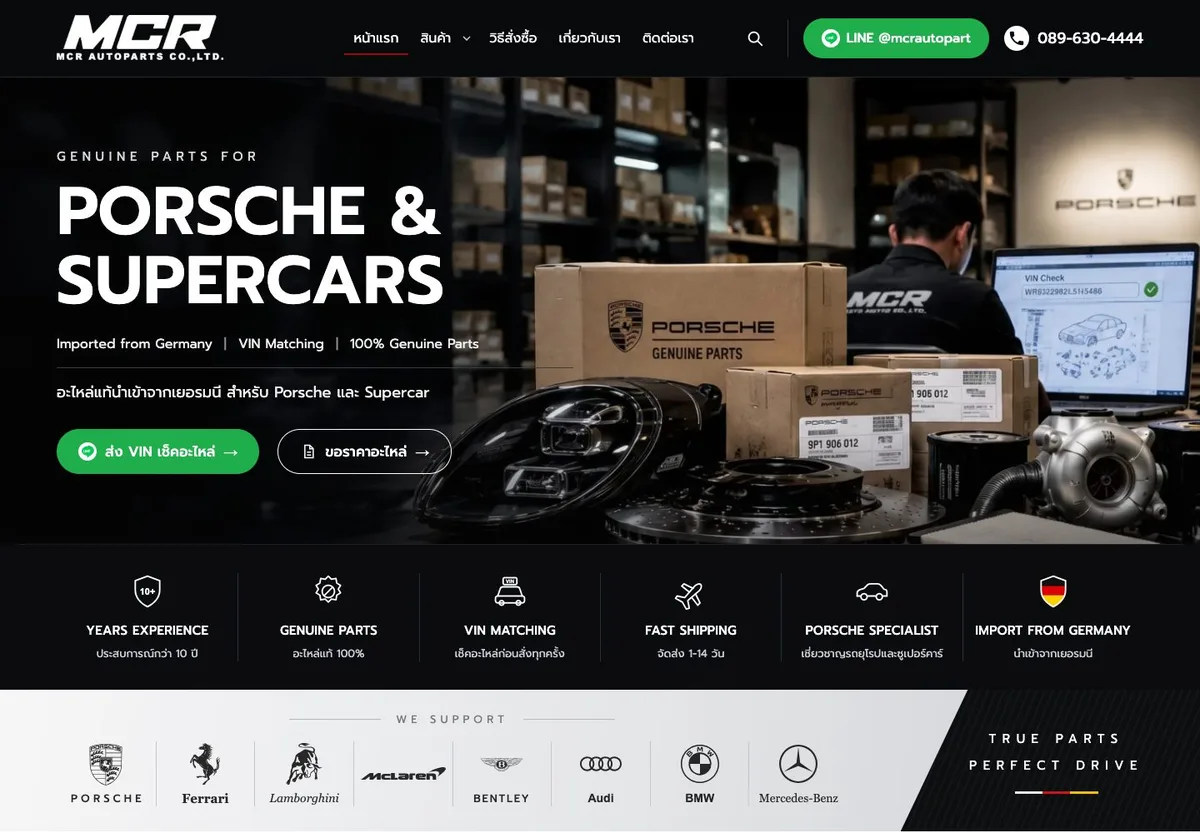
You’ll notice the “send your VIN to check parts” button sits on the first screen, with LINE/phone in the header of every page and a sticky bar on mobile. That’s because this shop takes orders over LINE; every sale starts with that button. However good the design looks, it’s useless if customers can’t find it.
7. SEO migration: 301s for every old link pattern
This is the real heart of any website move. A site that has been around for years holds value you can’t see: old links that Google remembers and that other sites point to. If those links turn into 404s after the move, everything they carried goes with them.
7.1 Listing old links from four sources
No single source is complete, so we pulled from four:
- The full catalogue crawl of the live site (section 4.1)
- The old sitemap
- Pages known to Ahrefs, pages with traffic and pages with backlinks; an “add to cart” link that every other method missed turned up here
- The shop’s official export and an offline copy of the site
7.2 Where each kind of old link goes
| Old link | New destination | Count |
|---|---|---|
| Product page (ID + Thai name) | The same product’s English URL | 1,576 |
| Category page (category ID) | The closest make/model category; a one-product sub-category goes straight to that product | 1,698 |
| Categories already empty on the old site | The nearest parent category | 29 |
| “Add to cart” links | That product’s page | Every product |
| Tag pages | Search results for that tag | Every tag |
| Old menu pages, forms, the payment article, gallery | The new page with the same role | Set one by one |
| Old web board (spam only) | Homepage | Content not migrated |
| http:// | https:// | Whole site |
7.3 Two choices that keep these 301s from breaking
First, we match on the numeric ID only. Old links on this site carry the Thai product name in the URL, and when links get shared around they’re often truncated or encoded differently. Match on the name and those links break. The product ID never changes, so however mangled the name gets, the link still lands on the right page.
Second, we didn’t stuff 3,274 lines into an .htaccess file, which the server would have to read on every single page view. The old IDs are stored with products and categories in the database, and a cached lookup table is built from them. A bonus: if the shop changes a product URL later, its 301 follows automatically, with nobody having to fix anything.
7.4 The same checklist after every change
Every time anything on the site changed, we went through the same checklist again: open all 1,801 URLs in the new sitemap and confirm each returns 200, then try a sample of old links and confirm each 301s to its destination in one hop. It passed every time.
A few edge cases turned up along the way, and each was dealt with:
- An “add to cart” link known to Ahrefs returned 404; it now goes to the product
- 29 categories already empty on the old site now go to their parent instead of the all-products page
- Old tag pages that returned 404 now go to search for the same term
- 3 links that were already broken in the old sitemap got 301s too
- The price filter’s parameter clashed with a reserved WordPress name, so it was renamed
One more small but important thing: we carried the existing Google Search Console verification code over to the new site. On switch day, GSC ownership won’t drop, and the data stays continuous in the same place.
8. SEO analysis and setup across the site
8.1 Template-based Title / Meta / Alt
Nobody can hand-write titles for over a thousand products, and hand-written ones are never consistent anyway. So we designed a template for each page type and let the system fill it from each product’s real data.
| Page | Title template | Meta description approach |
|---|---|---|
| Product | {product name + make + model} อะไหล่แท้ | MCR Autoparts (65 characters max) |
Product name, genuine part, which car model, authenticity guarantee, VIN check, contact channels |
| Make category | อะไหล่ {make} ของแท้ นำเข้าจากเยอรมัน/UK | MCR Autoparts |
Every genuine part for this make across all models, VIN check, enquire for price |
| Model category | อะไหล่ {make model} ของแท้ | MCR Autoparts |
Genuine imported parts for this model, VIN check |
| Paginated pages | “ – หน้า N“ (“page N”) appended | Avoids duplicate titles |
| Product image alt | {product name} อะไหล่แท้ จาก MCR Autoparts |
File names in English by make/model |
The site is Thai-only, so the templates are in Thai (“อะไหล่แท้” means “genuine parts”).
Values for all 1,576 products, every category and every page went into Rank Math, so the shop’s team can keep adjusting them in the admin.
8.2 Schema for a parts store
| Schema | Where it’s used |
|---|---|
Product + isAccessoryOrSparePartFor |
Product pages, telling Google which car model a part is for, with SKU and OEM number (when present) |
AutoPartsStore |
Store information, address and contact channels |
BreadcrumbList |
Every page: make › model › product |
CollectionPage / ItemList |
Make and model category pages |
The popularity stars on product cards are deliberately just a label, not review schema. They aren’t real customer reviews, and marking them up would only invite a penalty from Google.
8.3 Internal links, indexing and speed
Internal links: a make → model mega menu with about 160 links on every page, the same as the old menu but much easier to read, plus make › model breadcrumbs, model chips with product counts on make pages, make/model rows on product pages that link to their categories, and 6 related products per page.
Indexing: during testing every page is noindex and robots.txt is closed, so Google doesn’t mix the test site up with the real one. On launch day a single “Launch” switch turns on indexing, robots and canonicals together. Search results and empty pages are always noindex.
Speed: the homepage HTML used to weigh 436 KB because the homepage schema listed all 1,576 products. Removing that brought it down to 132 KB. We also added a 400 px card image size so phones don’t download oversized images, and improved text contrast and tap-target size on mobile.
8.4 Two rounds of duplicate checks, with the owner deciding
Shops that have been adding products for years usually have some duplicates hiding in there, so we went looking:
| Round | Method | Result |
|---|---|---|
| 1 | Compared product names | 46 groups, but it still missed cases like the A5 vs the A5 facelift |
| 2 | Also compared old sub-category names, descriptions, car models and the similarity of all 1,576 photos, then reviewed 88 groups by eye | 30 groups likely the same · 13 need the shop to confirm · 26 genuinely different |
12 duplicate groups could only be found from the photos, because the names differed and the shots were taken from different angles. We also found 43 groups where one photo was used for several car models, plus some data errors, such as a product named as a window motor whose photo shows a wiper motor.
We didn’t delete or merge a single product ourselves. The person who knows how two parts differ is the shop owner, not us. Every group went to the shop with links to the old and new pages and tick boxes.
8.5 The shop’s migration report (17 pages)
On 18 September 2026 the shop received a report summarising all of the above in business language, something they could read and decide on without translating any jargon:
- Migration overview
- The new site’s URL structure
- Protecting existing rankings (301 redirects)
- Technical quality of the new site
- Product pages that may be the same product
- Information needed from the shop before launch
- Southern Whale’s recommendations
9. Quality checks before handover
| Check | Result |
|---|---|
| Products vs the shop’s official export (5 Oct 2026) | 1,576/1,576 matched by old ID: none missing, none extra, none hidden; main images, extra images, badges and tags all match |
| URLs in the new sitemap | 1,801/1,801 return 200 |
| Every old link pattern | 301 to the correct page in a single hop |
| Visual check of every page at 390 px mobile + 1,440 px desktop | 3,604 checks, no issues left after fixes (one H1 per page, no sideways scroll, no broken images, no errors) |
| Lighthouse mobile (test site, 22 Sep 2026) | Performance 99–100 · Accessibility 100 |
Lighthouse was measured on the test site after the move to the block theme, before the redesign rounds.
10. Handover: the shop’s team runs it themselves
A good website shouldn’t need a call to us every time new stock arrives.
- The shop’s account can add, edit and delete products, categories, menus, banners, contact details and Title/Description, but can’t reach plugins or data export, so one wrong click can’t break the site
- Saving publishes immediately. We tried it with the shop’s real account: a new product appeared at once on the product page, category, archive, homepage and search, and deleting it correctly produced a 404
- A 24-page Thai manual, readable inside the WordPress admin
- A 2:18 how-to video on adding a product, recorded from the real screen
11. Before / after summary
| Old site | New site | |
|---|---|---|
| System | iGetWeb (closing its service) | 100% WordPress, the shop’s own block theme, free to move hosts |
| Mobile | Desktop layout scaled down | Built for mobile, with LINE/phone buttons |
| Sitemap | Fewer than 60 URLs, no products | 1,801 URLs covering every product and category |
| Categories | 1,728 per-product sub-categories | Make › model (22 makes · 112 models) |
| URLs | Numbers mixed with Thai | Descriptive English |
| Product SEO | Title = product name · meta empty | Title/Meta/Alt templates + parts schema |
| Old links | — | 301s for all 3,274 IDs and every other pattern, single hop |
| About page | Images only | Real text in Thai and English |
| Design | Unchanged for years | Bright luxury in white, black and silver, matching the brand |
| Maintenance | On the provider’s system | The shop’s team edits it, with a 24-page manual and video |
12. Launch-day checklist
As of 6 October 2026 the new site is ready and the switch to the live domain is being prepared. This is the checklist agreed with the shop:
| Step | What |
|---|---|
| Before launch | Move products the shop added on the old site after the migration · finish merging duplicates the shop confirms · adjust the shop account’s permissions |
| Launch day | Point the domain and issue SSL · force a single www host · flip the Launch switch · purge caches |
| Right after | Re-check the 1,801 URLs and every old link pattern on the live domain · submit the sitemap in Search Console · install GA4 |
| First weeks | Watch 404s and indexing in Search Console · keep the old service until everything is stable |
What you get working with Southern Whale
This case reflects how we work with every shop:
5 lessons for shops planning a website move
| # | Lesson | How |
|---|---|---|
| 1 | Move like-for-like first, then redesign | Get the content and the familiar look stable, prove nothing is missing, then redesign on solid ground |
| 2 | List old links from several sources | Don’t rely on the old sitemap alone; it may not contain any product pages |
| 3 | Every 301 should go to the closest page, in one hop | Sending everything to the homepage tells Google those pages are gone |
| 4 | Check against the official export | Count until you know everything is there, not “probably” there |
| 5 | Let the owner decide about products | We can find and group the candidates, but the shop knows its parts |
Checklist before moving a shop website
- You have a full list of old URLs for every product and category (not just from the sitemap)
- You know which pages get Google traffic and which have links from other sites
- You have a page-to-page 301 plan, not “send everything to the homepage”
- You’ve exported the product data from the old system to compare after the move
- The Google Search Console verification code moves to the new site
- The shop’s team has tried adding a product with their own account before launch
- You don’t cancel the old service until the domain has moved and everything is stable
Questions shop owners often ask
My site is on iGetWeb and has to move. Where do I start? Start by collecting everything before the old system closes: request a product export from the admin, list every old URL (products, categories, tags, menu pages) and note which pages get Google traffic. Then choose the new system, move the products, set page-to-page 301s and carry the Search Console verification over. Don’t cancel the old service until the domain has moved.
Can I clone my iGetWeb site to WordPress so it looks exactly the same? Yes, and it’s the approach we recommend: move like-for-like first, including the menus, make order, product pages and theme images, make sure every product and link is there, then redesign later at the shop’s own pace. If you change the platform and the design at the same time, when something goes wrong you can’t tell which one caused it.
Will moving my website cost me my Google rankings? The main risk comes from old links that turn into 404s or all get sent to the homepage. If every page has its own 301 and you submit the new sitemap, Google can transfer the signals to the new pages. Rankings may move up and down a little at first, so watch Search Console for at least 3 months.
My shop has thousands of products. Do they have to be re-entered one by one? No. In this case we moved 1,576 products with all their photos, badges and tags, then checked them against the official export until every item matched.
Should I choose a hand-coded site or WordPress? If you add products often and want your team to edit and publish instantly, a custom WordPress block theme is the better fit. If the content barely changes and top speed is the priority, a hand-coded site is good too. The best approach is to ask for both demos with your real products and try them yourself.
My shop doesn’t sell through a cart. Do I need WooCommerce? Not necessarily. A shop that sells by enquiry or VIN check can use a lighter product system without a cart, which makes the site faster and the admin simpler.
Moving off iGetWeb or another site builder, but worried about losing what you have?
Send us your site first. We’ll analyse it for free, tell you which links matter and how to move them, and point out what your current site isn’t using yet. If you talk to us and decide not to hire us, that’s fine.
See our WordPress development, web development and SEO audit services, or browse more case studies.